iOS App · Web app
Restaurants or convenience stores. Choose by nutrition.
Compare real menu items with your own per-meal target.
46,000+ items from 340+ chains, refreshed daily. Search and compare before you eat, then log it. On iPhone or the web, pick up from today’s remaining balance.
iPhone: get it on the App Store. Android and desktop: use it right in your browser.
The item you chose and what remains afterward stay together — continue anytime on iPhone or the web.
Want an Android version?
Thanks! We'll consider an Android version as demand grows.
Covers 340+ chains across convenience stores, gyudon, ramen, cafés and more — plus 5,200 generic dishes: home cooking, regional dishes and single ingredients
Three ways Kalori is different
Before you eat or after: decide with your own numbers.
Choose from what you have left
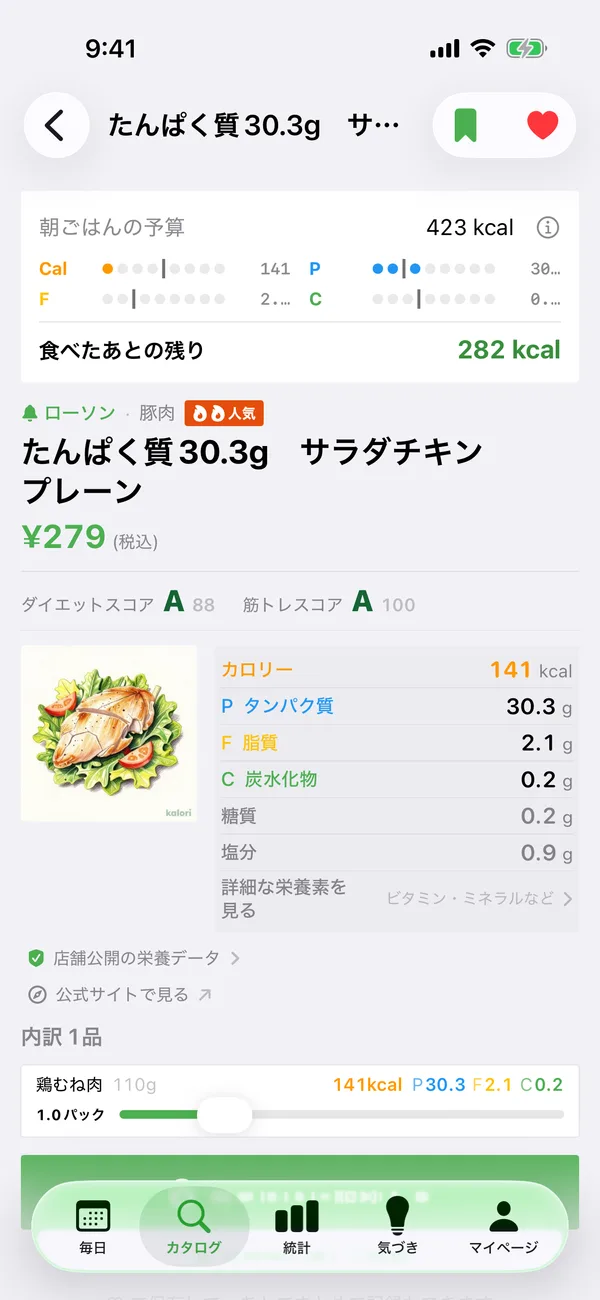
See calories and remaining P/F/C, then search across chains for an item that fits your own meal target.
Match what you actually ate
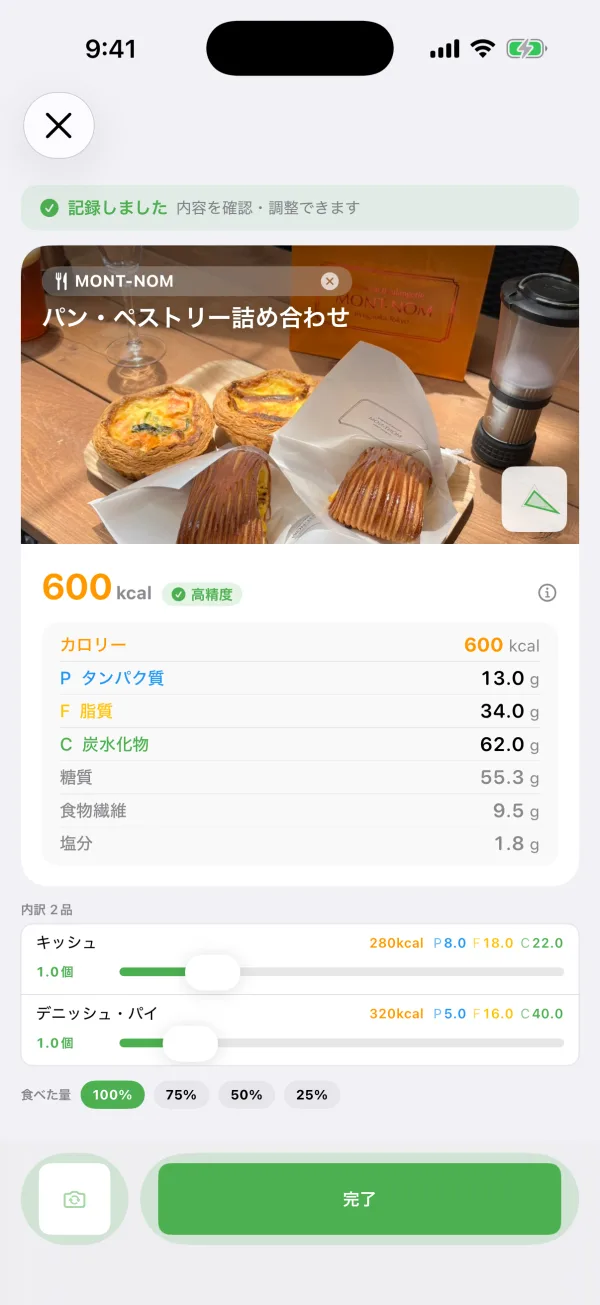
Less rice, half the dressing — move each component and watch total calories and macros change on the spot.
Log whichever way is fastest
Snap it, describe it, pick from the catalog, reuse a previous meal, or enter it yourself. Choose what works in the moment.
What you can do with Kalori
Choose chains and calorie goals, then search 46,000+ items
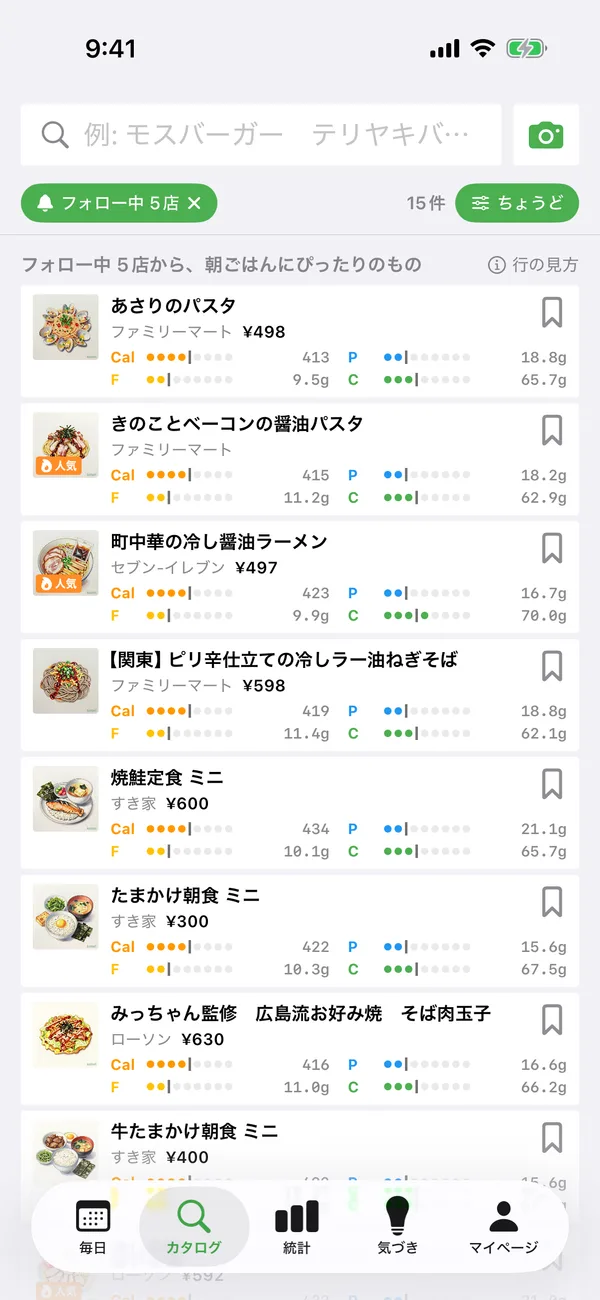
Open the catalog and it shows items from the chains you follow that are a close fit for what you have left. The left chip lets you choose one or several chains, all followed chains, or nearby chains. The condition chip switches between within budget, closest fit, high protein, lighter, low fat, and popular. You can also search by name or genre, then see your meal target, the item's nutrition, and what would remain afterward on one screen.
Turn your choice into today's log
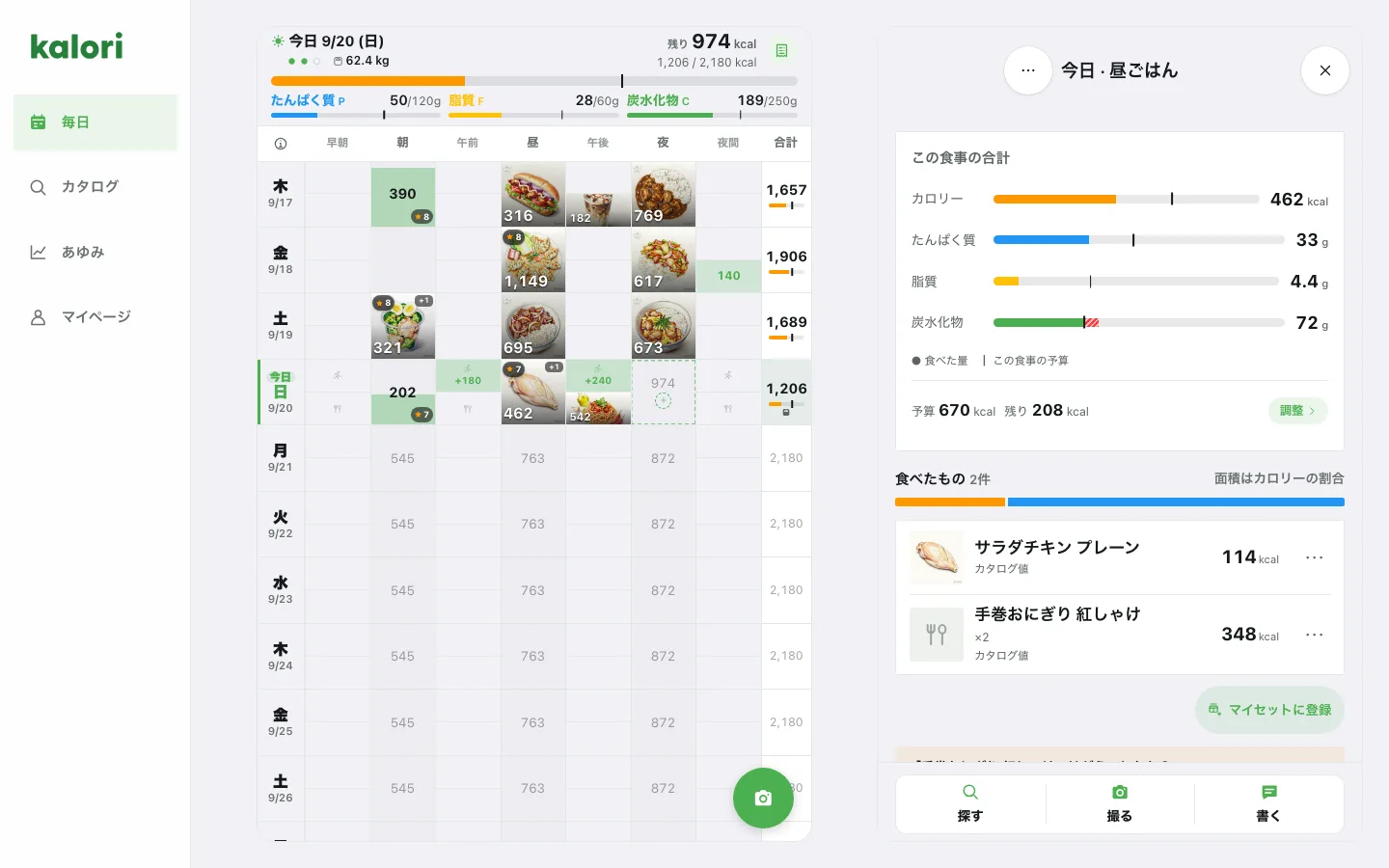
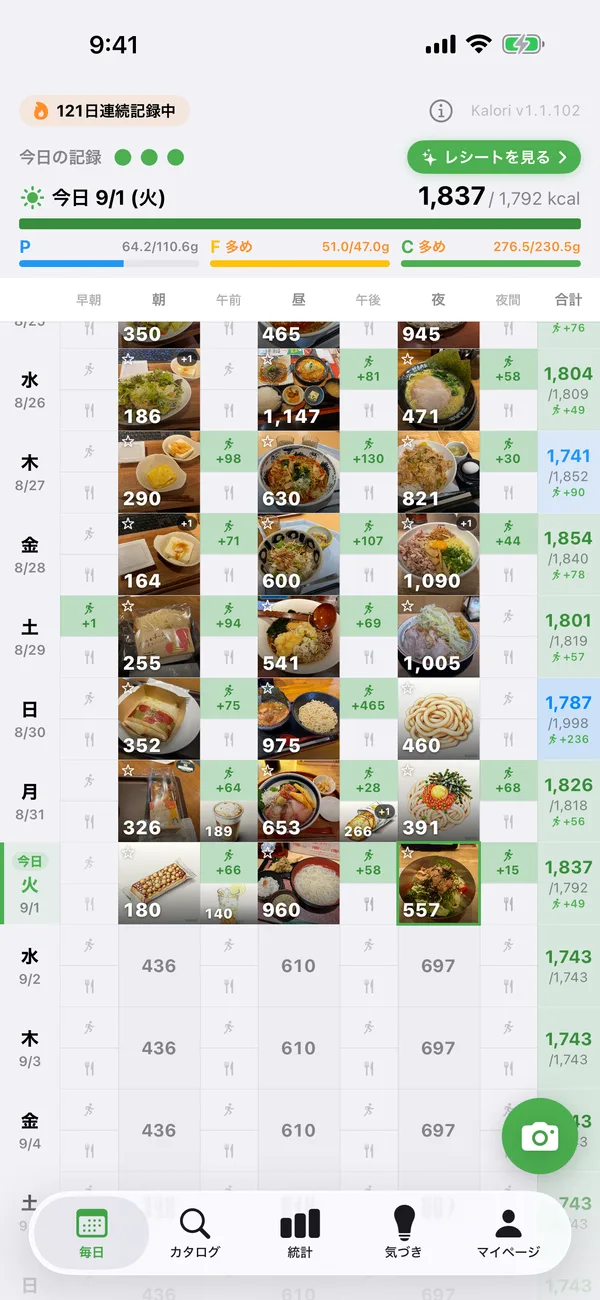
Log an item to breakfast, lunch, dinner, or a snack when you eat it. Your remaining daily calories and macros update immediately, ready to guide the next choice. You can also plan meals up to two weeks ahead.
Adjust it to match what you actually ate
Read calories and macros from a meal photo, broken down into components such as rice, tempura and miso soup. Move a component — less rice, for example — and the total changes immediately. Saving the adjusted breakdown is a Premium feature.
Your day, printed as a “nutrition receipt”
Turn any day's meals into a store-style receipt image you can save or share — complete with a scannable barcode, and a stamp on days you hit your targets. The kind of record you'll want to collect.
See your progress add up
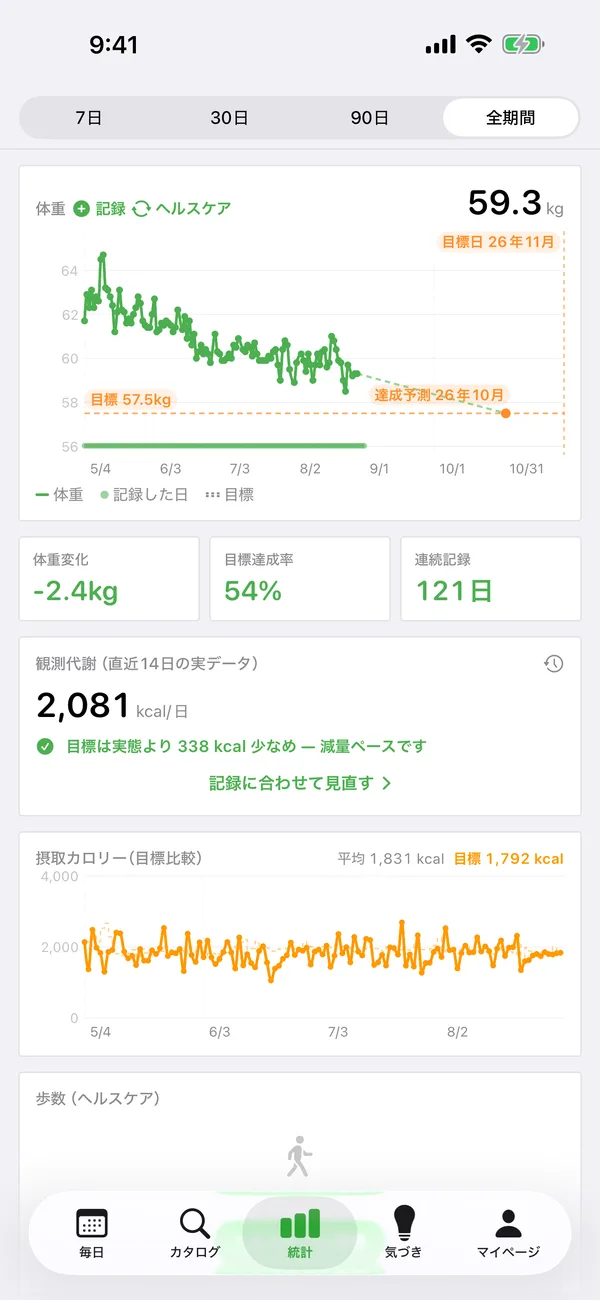
Your weight and meal logs feed an observed-metabolism estimate, charted over time. Streaks, PFC trends and even HealthKit steps — everything you've kept up, at a glance.
Ask ChatGPT or Claude about your own meals
Register one connector URL and sign in with Apple — then ChatGPT or Claude can log, edit and review your meals. Just ask 'what should I have for dinner?' or 'how did my PFC look last week?' in plain conversation.
Log in chat. See it in the app.
Your everyday chat AI
I had a 7-Eleven salad chicken for lunch, log it
Logged ✓ Salad Chicken (plain), 113 kcal · 24.1 g protein. You have 1,240 kcal / 52 g protein left today.
The kalori app's meal calendar
Log in chat → shows up in the app
Text ChatGPT "salad chicken for lunch" on the go. Open the app and it's already sitting in the lunch slot on your calendar.
Log in the app → review in chat
Photo records from the app feed the conversation too — ask Claude "how did my PFC look today?" at night.
One data set, growing everywhere
Stats, streaks and nutrition receipts grow from the same records no matter where you log. No double entry, no manual sync.
What you can do from chat
Catalog search (free)
Search 46,000+ items across 340+ Japanese chains by name or calorie range. Official nutrition data plus AI estimates.
Log by dish name (Premium / trial)
A database of ~4,000 generic dishes (ramen, oyakodon and more). Home cooking and non-chain meals get standard nutrition with component breakdowns.
Log & edit meals (Premium / trial)
Say what you ate to log it; say "left half of it" or "it was two servings" to fix it. Past dates work too — handy for importing history.
Weight logging (Premium / trial)
Just say "64.8 kg this morning" and it lands on your weight chart. Your daily report becomes the record.
Nutrition advice (Premium / trial)
"What can I still eat today?" "Am I getting enough protein this week?" "How about iron?" — answered from your records and goals, down to 27 micronutrients.
Exercise, favorites & ratings (Premium / trial)
"Ran 30 minutes" logs the burn; "add this to favorites" and "that ramen was a 7" work right from chat too.
Planning & budgets (Premium / trial)
"Keep tomorrow's dinner under 800 kcal" "Saturday is a cheat day" — set budgets, find meals that fit, and place them on the plan calendar, all in conversation.
Set suggestions (Premium / trial)
"What fits in my remaining 600 kcal at 7-Eleven?" — get product combos that match your calorie and PFC targets.
A linked Kalori account is required. Catalog search is available without a purchase. Kalori accounts registered on the web currently have complimentary access to personal-record features through external AI integrations under a grace policy. No end date has been set; a paid plan may be required in the future. Usage limits still apply. Accounts outside this grace policy use their existing entitlement or integration trial. The trial lasts seven consecutive days from the first eligible operation and is not consumed while grace access applies.
How to connect & everything it can do (MCP guide)Try any of these screens for yourself
The app is free to download. Searching the catalog and logging meals stay free, always.
Three ways in
From the app, from the web, or from your chat AI.
It is the same account and the same records everywhere. Snap a photo on your iPhone, review it in a browser on your desktop, ask ChatGPT about it — you always pick up where you left off. No iPhone? The browser version (my.kalori.jp) is enough on its own.
One account, one set of records
Meals and targets stay in sync wherever you use kalori.
Log on iPhone
Use a photo, the catalog, or manual entry in the moment.
Review in a browser
Pick up the same records on Android or desktop.
Ask your chat AI
ChatGPT and Claude answer with your records and targets in context.
What each way in can do
| Capability | iOS app | Browser | Chat AI |
|---|---|---|---|
| Search and compare the catalog | Yes | Yes | Yes |
| Log a meal | Yes | Yes | Yes |
| Read a meal from a photo | Yes | Yes | — |
| Read a meal from text | Yes | Yes | Yes |
| See what is left today | Yes | Yes | Yes |
| Record weight and exercise | Yes | Yes | Yes |
| Stats and insights | Yes | — | Ask in chat |
| Nutrition receipt | Yes | — | — |
| Map of places you ate | Yes | — | — |
| Export your data | Yes | Yes | — |
| What you need | iPhone (iOS 18+) | A browser (Android / PC too) | ChatGPT / Claude |
Catalog search and ordinary meal logging in the app and browser are free. AI analysis of photos and text follows the account's access conditions. External AI integrations have separate access conditions. A linked Kalori account is required. Catalog search is available without a purchase. Kalori accounts registered on the web currently have complimentary access to personal-record features through external AI integrations under a grace policy. No end date has been set; a paid plan may be required in the future. Usage limits still apply. Accounts outside this grace policy use their existing entitlement or integration trial. The trial lasts seven consecutive days from the first eligible operation and is not consumed while grace access applies.
Your records are yours. Take them with you anytime.
Save the meals, weight, exercise, goals, favorites and other records you build in kalori as a ZIP containing structured JSON and separate CSV files. Your history is not locked inside the service — keep it for spreadsheets or your own analysis.
JSON + separate CSV files
A structured JSON file plus individual CSV files for meals, weight, exercise and more, with a README that explains the archive.
Free on every plan
Your records remain after Premium ends, and exporting them never requires an additional payment.
Verified with Apple ID
Re-authenticate before export, then save the ZIP to Files or send it through AirDrop and the iOS share sheet.
The export is limited to records needed for meal management. It excludes photos, detailed nutrients, and billing, search, or MCP connection history.
Your export ZIP
kalori-data-YYYY-MM-DD.zip
- Meal records
- Weight records
- Exercise records
- Goal history
- Favorites
- Foods you added
Who kalori Is For
Not sure what to pick at the counter
Search by item or chain and compare it with your per-meal target. Calories, macros and what remains afterward stay visible, so Kalori handles the arithmetic while you make the choice.
You eat out or hit convenience stores a lot
For anyone short on time to cook. With 340+ major chains inside, you can pick what to grab for lunch based on nutrition.
On a diet and watching the numbers
Sort products by how they fit your remaining macros. Mismatches like 'calories fit but protein is short' are easy to spot.
Training and need your protein
Sort by 'most protein' or find items that fit your remaining protein target. You can even hit your daily goal with convenience store items alone.
You'd rather manage it from ChatGPT or Claude
With external AI integration, ChatGPT and Claude can safely access your logs. Ask 'review last week's PFC' or 'what's for dinner?' right in the chat.
More to explore
Official convenience store & restaurant data
340+ chains across convenience stores, gyudon, fast food, family restaurants, udon, and cafés — independently compiled and estimated from each chain's published nutrition info, and kept up to date every day.
Your restaurant map, built from your logs
Meals logged with a store pile up on your personal map — look back at where you eat out and what you ate there.
Targets that adapt to you
kalori recalculates your daily calorie target from your weekly weight and intake history, so your goal never drifts out of sync with reality.
Log however you like
Choose a photo, free text, the catalog, manual entry, or a previous log — whichever fits the moment. Search your entire history by name, or reuse the original breakdown when a photo looks like something you logged before.
Choose where your numbers come from
See whether a log is using values you entered, a photo estimate, or the catalog. Compare the sources and switch which values the record uses.
Apple ID login / export or delete anytime
One-tap Apple ID login, free JSON and CSV export of meals, weight and other records, and account deletion from inside the app whenever you choose.
Frequently Asked Questions
What kind of app is Kalori?
Kalori is an iOS app that helps you judge how real convenience-store and restaurant menu items relate to your own goals before you eat, then carry your choice into logging and review afterward. It covers 46,000+ products from 340+ Japanese chains; catalog search and meal logging are free.
How is kalori different from other meal tracking apps?
The biggest difference is that Kalori shows a real menu item, your per-meal calorie and macro target, and what would remain afterward on the same screen. You can use that comparison before eating without logging anything, or log the item afterward to update today's balance and longer-term trends. Unlike user-submitted databases, Kalori's catalog is maintained by our team under one consistent standard.
Which Japanese chains are supported?
340+ chains including Lawson, FamilyMart, Ministop, Sukiya, Yoshinoya, Matsuya, Nakau, Gusto, Bamiyan, Jonathan's, Saizeriya, Denny's, Royal Host, McDonald's, MOS Burger, KFC, Lotteria, Kura Sushi, Sushiro, Hama-Sushi, Marugame Seimen, Hanamaru Udon, CoCo Ichibanya, Ootoya, Yayoiken, Hidakaya, Ringer Hut, Starbucks, Doutor, Tully's, and many more.
Does it work if I cook at home?
Yes. Alongside chain products, the catalog holds 5,200 generic dishes — home cooking, Japanese regional dishes and single ingredients — so you can search by name and log things like tamagoyaki, Caesar salad or Fukagawa-meshi. Many entries carry a portion, such as "sliced bread (1 slice, 60g)" or "raisins 30g". Anything you eat often can be saved to My Foods and re-logged in one tap. All of that is free. Estimating from free text such as "200g chicken breast and 150g rice", and adjusting the per-ingredient breakdown, are Premium features.
How does the AI food photo analysis work?
Photos are sent to an external AI service, which identifies foods and estimates calorie and PFC values. For new accounts, it is free to try for seven days from sign-up; after that, Premium allows up to 100 analyses per day. Results are shown with confidence indicators and can be corrected.
How do I log a meal?
Open a meal slot for today and tap + on a recent log or catalog item to save it immediately; you can keep adding another item to the same meal. You can also log from a photo, free text, or manual entry, and search your full history by name to reuse something you ate before.
Can I adjust a meal for less rice or a smaller portion?
Yes. Move individual components from a photo or generic dish and total calories and macros update immediately — for example, half the rice or less dressing. Trying the adjustment is free; saving the adjusted breakdown to your log is a Premium feature.
How accurate is the nutrition data?
Calorie and PFC values come from each chain's official nutrition information. Only fields missing from the official source are filled in by AI, and every AI-estimated field is labeled with a confidence badge and reasoning. Unlike user-submitted food databases, the entire catalog is maintained by our team under a single consistent standard — no duplicate entries for the same product, and no contributor-to-contributor variance.
How much does it cost?
The app is free to download and you can start right after signing in. Searching and comparing the catalog, logging meals, building plans, and recording weight and exercise stay free forever — including after the trial ends. Browsing the product DB, rankings and meal builder on the web (kalori.jp) is free too, with no account needed. Premium (¥960/month, ¥4,800/6 months, or ¥7,200/year — ¥600/month equivalent) covers AI analysis from photos and free text, per-ingredient portion adjustment, 27 detailed nutrients, and long-range stats and history. New accounts come with a Premium trial.
Is there an Android version?
Currently iOS only. The web app at kalori.jp offers product browsing, rankings, and a meal builder in any browser.
Can I export the data I record?
Yes. From My Page, choose Export Data and re-authenticate with Apple ID. You will receive a ZIP containing structured JSON, separate CSV files and a README for your meals, weight, exercise, goals, favorites, foods you added and more. Export is free on every plan. Photos, activity logs, internal AI data and authentication tokens are not included.
How is personal data handled?
Authentication is via Apple Sign-In. Meal photos are used only for AI nutrition analysis and are never shared with other users. You can delete your account from the app at any time; see the Privacy Policy for post-deletion handling.
Where can I download it?
From the App Store under 'kalori', or directly at https://apps.apple.com/app/id6761054819.
Download on the App Store
iPhone (iOS 18 or later) uses the app; Android and desktop use the browser version (my.kalori.jp). Free to download and to sign up, and looking up restaurant PFC stays free. Export your records to JSON and CSV anytime at no charge; they remain available even after Premium ends.
Want an Android version?
Thanks! We'll consider an Android version as demand grows.
Free to download. Looking up restaurant PFC stays free
Details
- Product name
- kalori
- Category
- Meal tracking, nutrition logging, PFC macro tracker
- Platform
- iOS 18+ (iPhone). The browser version (my.kalori.jp) also runs on Android and desktop
- Region
- Japan (Japanese and English UI)
- Database size
- 340+ convenience store and restaurant chains, 46,000+ products, plus 5,200 generic dishes (home cooking, regional dishes and single ingredients) for logging food you cook yourself
- Key metrics
- Calories (kcal), Protein (P), Fat (F), Carbohydrates (C)
- Data sources
- Nutrition data independently compiled and estimated from each chain's published information (with AI gap-filling)
- Main differentiators
- Comparing real menu items with personal per-meal targets, convenience store / restaurant DB coverage, optional meal logging, external AI integration, and JSON / CSV export
- Pricing
- Free to download. Searching the catalog, logging meals, building plans and recording weight/exercise stay free forever. AI analysis from photos and text, per-ingredient portion adjustment, detailed nutrients and long-range stats are optional Premium (¥960/month, ¥4,800/6 months, ¥7,200/year — ¥600/month equivalent). New accounts include a Premium trial / The browser version (my.kalori.jp) has the same features and the same pricing; browsing the catalog on kalori.jp is free with no account
- Operator
- kalbi LLC (Japan)
How kalori Compares to Typical Meal Tracking Apps
Note: Compared against generalized feature profiles of (A) Japan-focused meal loggers, (B) global meal trackers, and (C) lightweight calorie counters. Specific product names are omitted.
| Feature | kalori | Japan-focused meal logger (typical) | Global meal tracker (typical) | Lightweight calorie counter (typical) |
|---|---|---|---|---|
| Calendar-based meal plan (reserve up to 14 days ahead) | Excellent | Partial | Partial | No |
| Real menu item, personal meal target, and post-meal balance on one screen | Excellent | No | Partial | No |
| Logging by photo, text, catalog, history, or manual entry | Excellent | No | No | No |
| AI food photo analysis | Yes | Yes | Yes | Partial |
| External AI integration (Claude / ChatGPT) | Excellent | No | No | No |
| Official data for 340+ Japanese convenience / restaurant chains, 46,000+ products | Excellent | Yes | Partial | Partial |
| Product-level price information | Excellent | Partial | No | No |
| Meal map (your dining history on a map) | Yes | No | No | No |
| Adaptive TDEE (weekly automatic recalculation) | Yes | No | Yes | No |
| Pre-meal decision UI (choosing, not logging) | Excellent | Partial | Partial | No |
| Monthly PFC report and insights | Yes | Yes | Yes | Partial |
| Browse product DB on web without account | Yes | No | No | No |
| iOS support | Yes | Yes | Yes | Yes |
| Japanese UI | Excellent | Excellent | Yes | Yes |
Excellent = comprehensive / Yes = supported / Partial = limited / No = not supported