

Nutrition & meal-tracking MCP · chat-AI integration
Your everyday chat AI, now a meal tracker.
Register one URL in ChatGPT or Claude. No token copying, no re-setup — just talk to search and log.
kalori provides a nutrition and meal-tracking MCP server you can use directly from ChatGPT, Claude and other chat AIs. Register one connection URL, sign in with Apple, and you can log meals, calculate calories, manage PFC macros and record weight and exercise entirely through conversation — all synced with the iOS app. It works on the free plans of both Claude and ChatGPT.

Connector URL
https://mcp.kalori.jp/mcp Any chat AI that supports MCP (Model Context Protocol) can connect with this URL. kalori's meal-tracking MCP server works on the free plans of Claude and ChatGPT.
A typical conversation
I had a 7-Eleven salad chicken for lunch, log it
Logged ✓ Salad Chicken (plain), 113 kcal · 24.1 g protein. You have 1,240 kcal / 52 g protein left today.
Going to Yoshinoya tonight. Anything that fits what's left?
The beef plate set (small rice) fits your remaining targets — with small rice, your P/F/C lands right on balance.
64.8 kg this morning. Also forgot to log last night's shoyu ramen
Logged 64.8 kg. I also added shoyu ramen to yesterday's dinner — with a noodles / soup / toppings breakdown you can adjust in the app.
Answers come back as cards
In apps that support MCP Apps (Claude, ChatGPT) you get cards, not just text — and the buttons inside them log and rate meals directly.
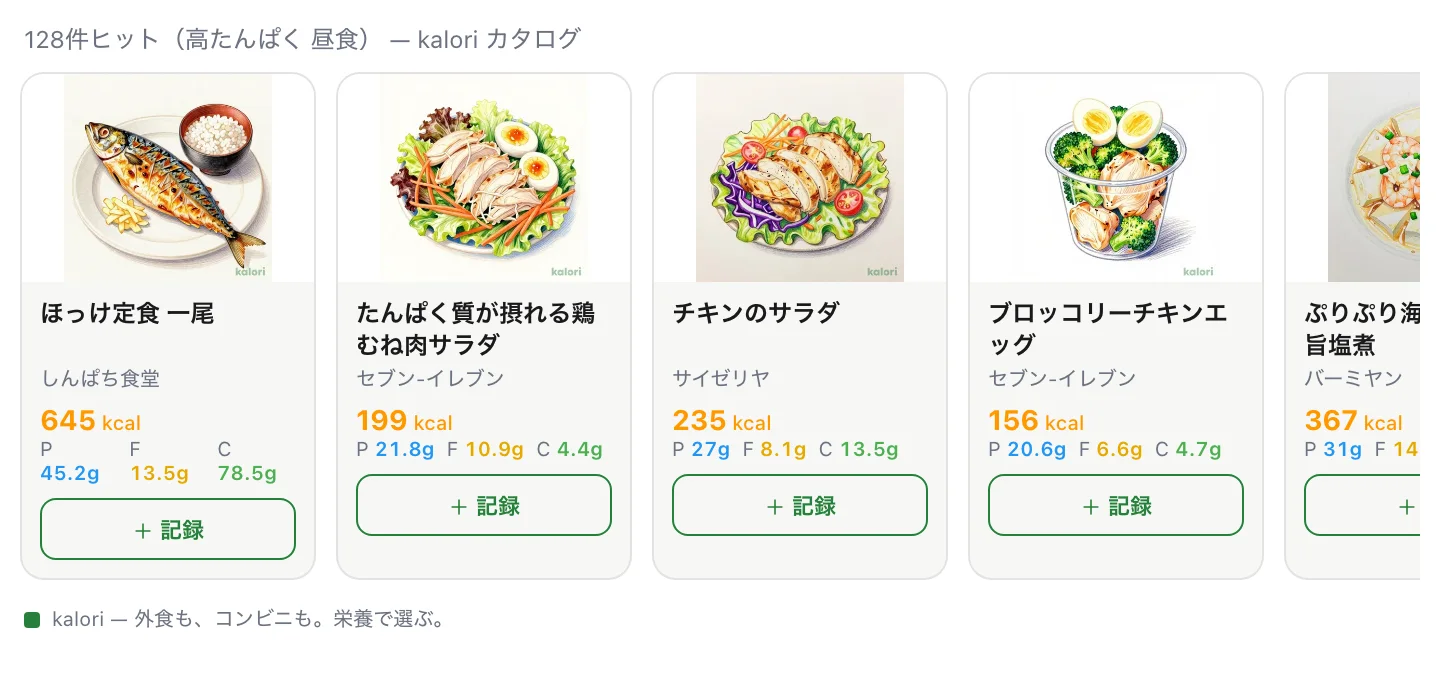
Search results Photos, calories and macros side by side. "+ Log" adds an item to today right there.
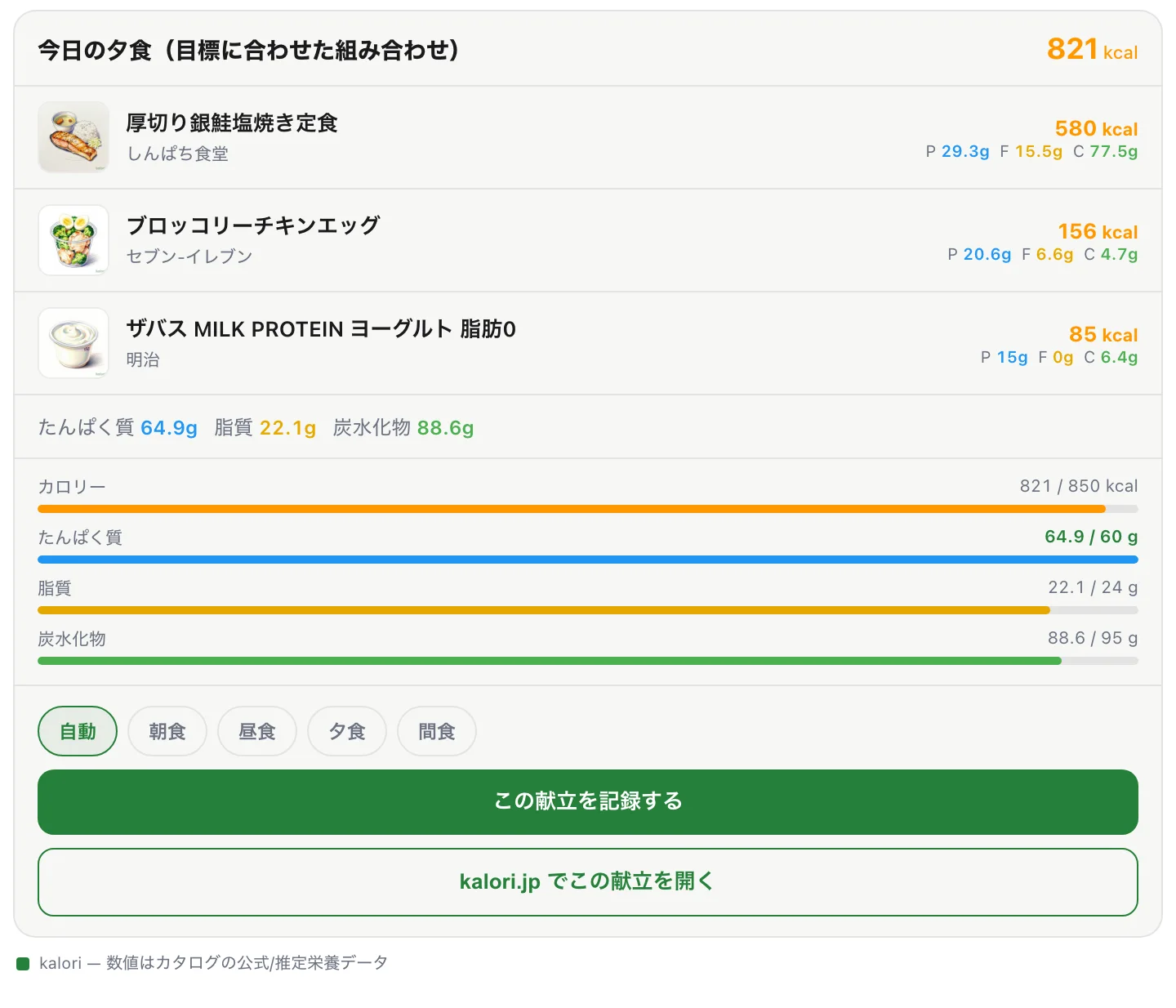
Meal plan card The plan your assistant put together, shown with kalori's confirmed numbers. Pick a slot and log it all at once.
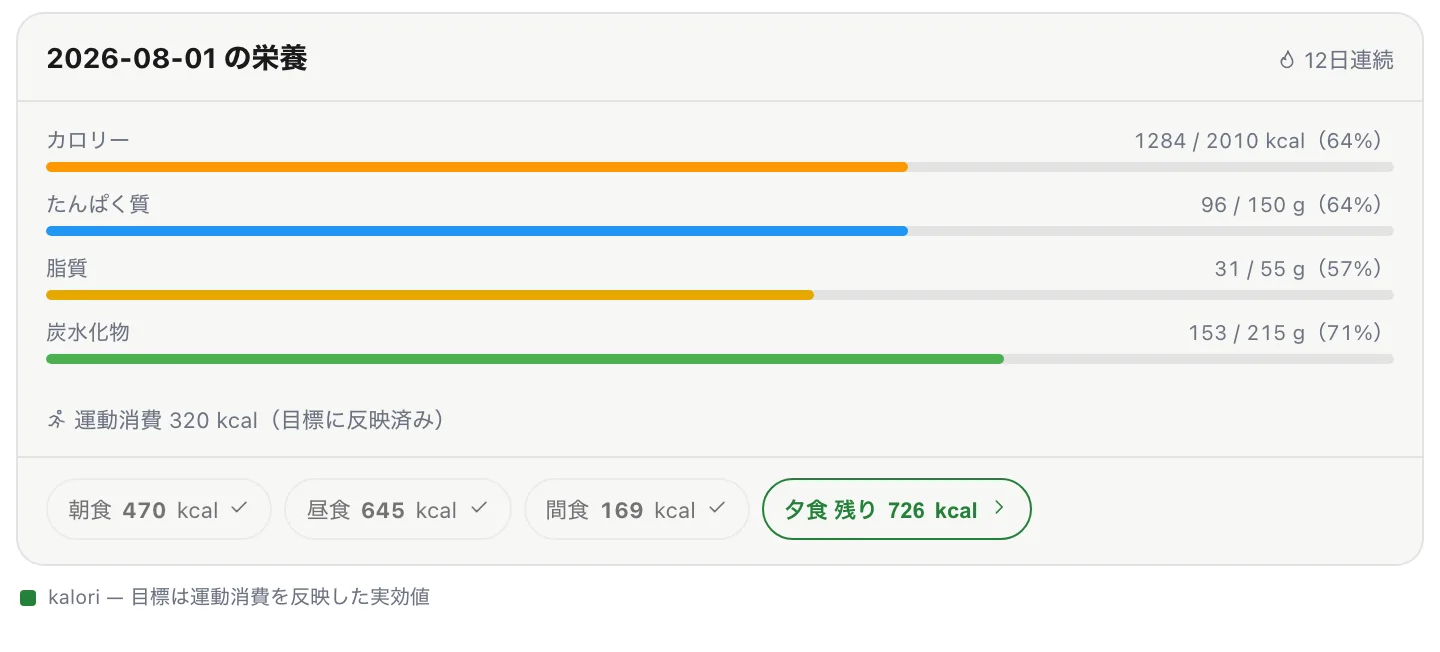
Today's nutrition Progress against your target, including what exercise added back. Tap an unlogged slot and the chat continues with "find something that fits".
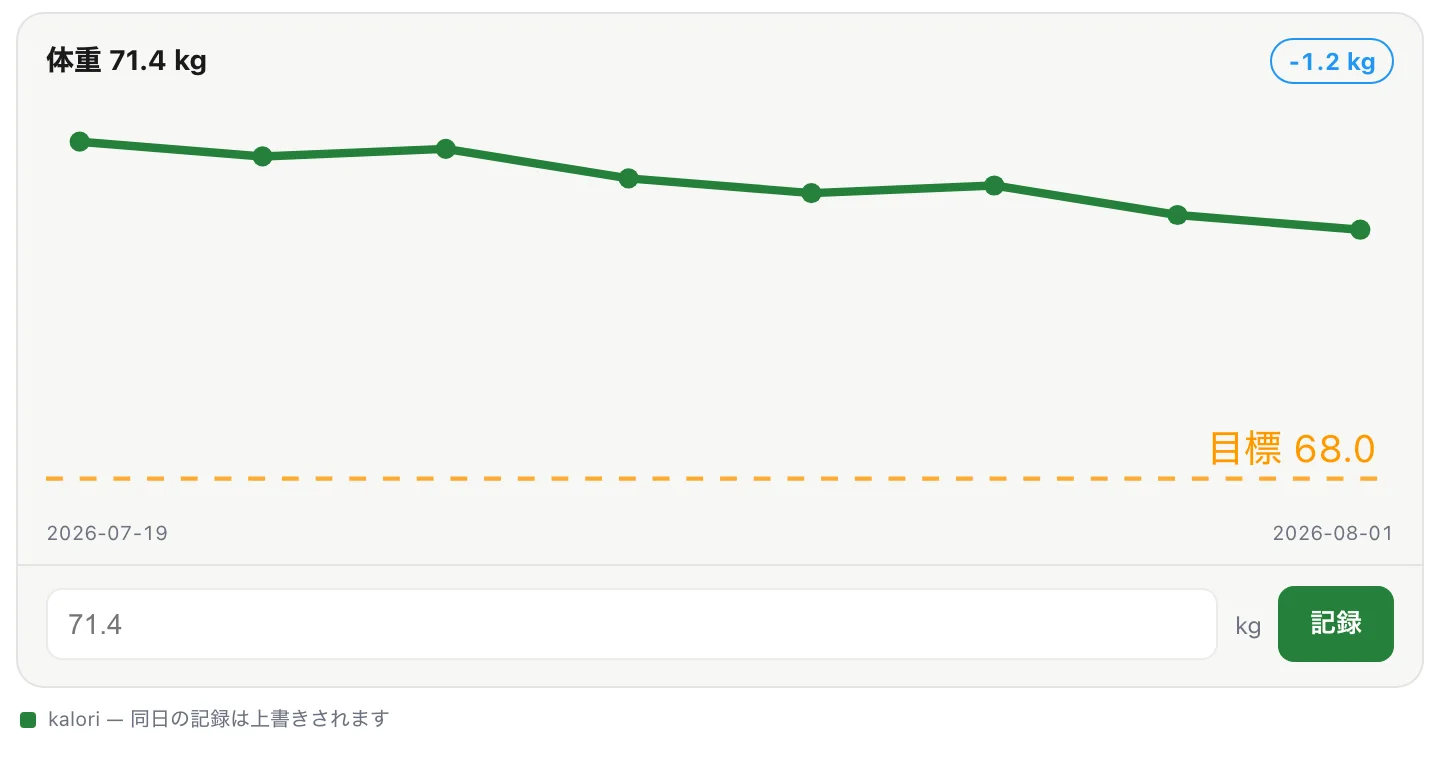
Weight trend A line chart with your target line — and a field to log today's weight on the spot.
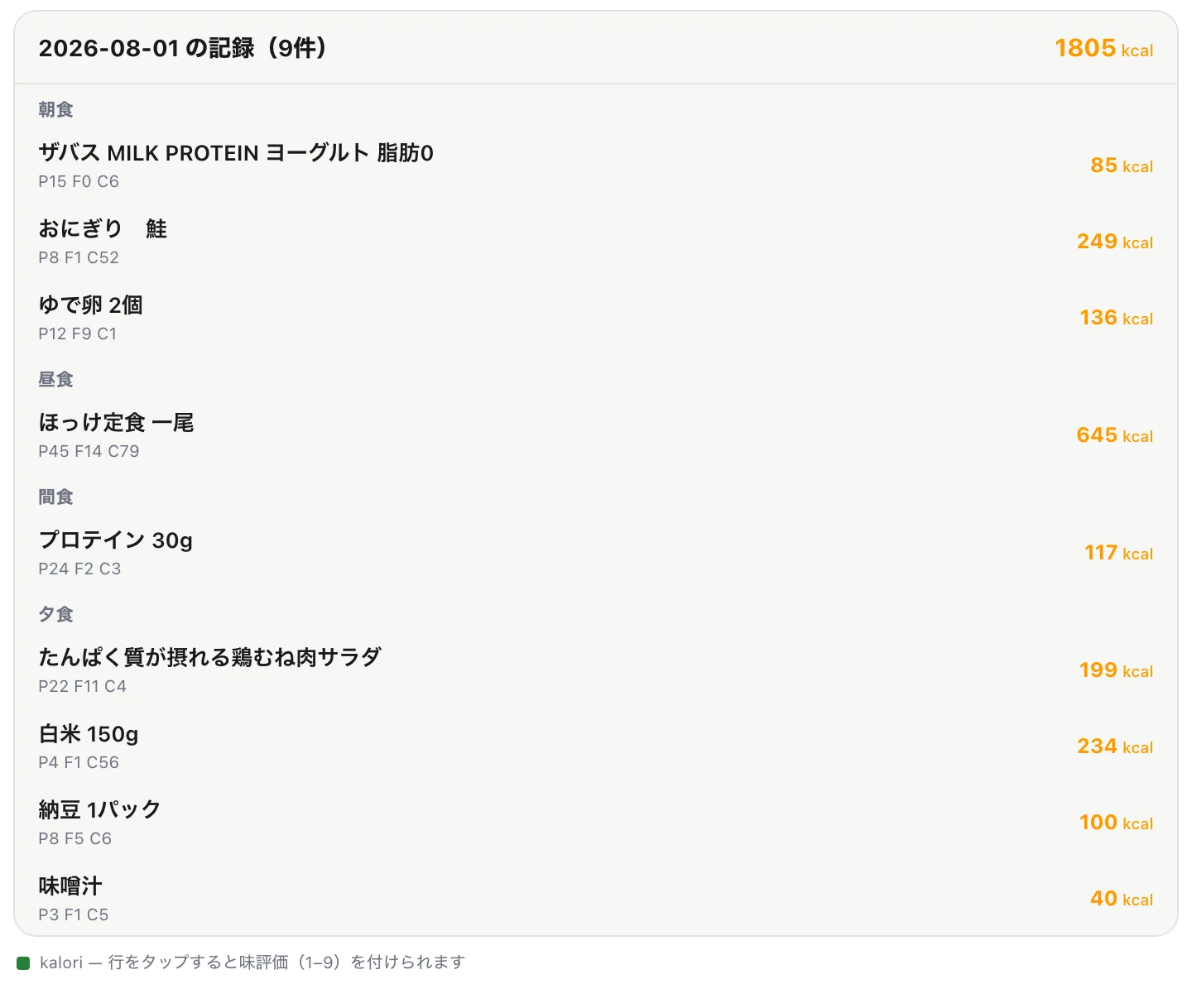
Today's log Meals grouped by time of day. Tap a row to rate how it tasted (1–9).
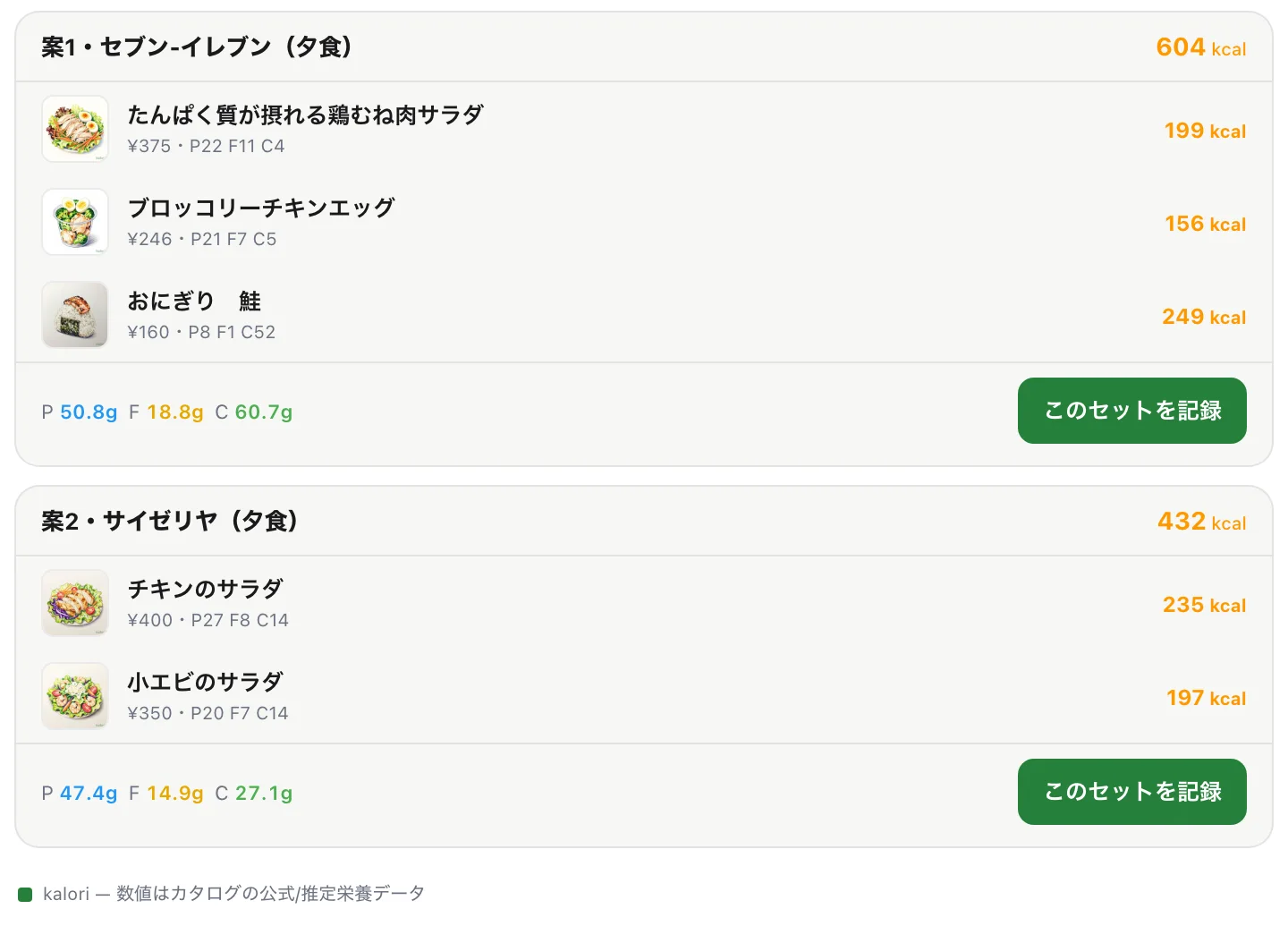
Set suggestions Combinations you can actually buy at one shop. Log the one you like in a single tap.
* Images are for illustration purposes. Presentation varies by the app you connect from.
Log in chat. See it in the app.
Meals can enter from chat or from the app — either way they sync to the same account and appear on your plan calendar, stats and nutrition receipt. Your log moves forward without opening the app; open it and everything is already there. This is meal tracking in the chat-AI era.
Your everyday chat AI
I had a 7-Eleven salad chicken for lunch, log it
Logged ✓ Salad Chicken (plain), 113 kcal · 24.1 g protein. You have 1,240 kcal / 52 g protein left today.
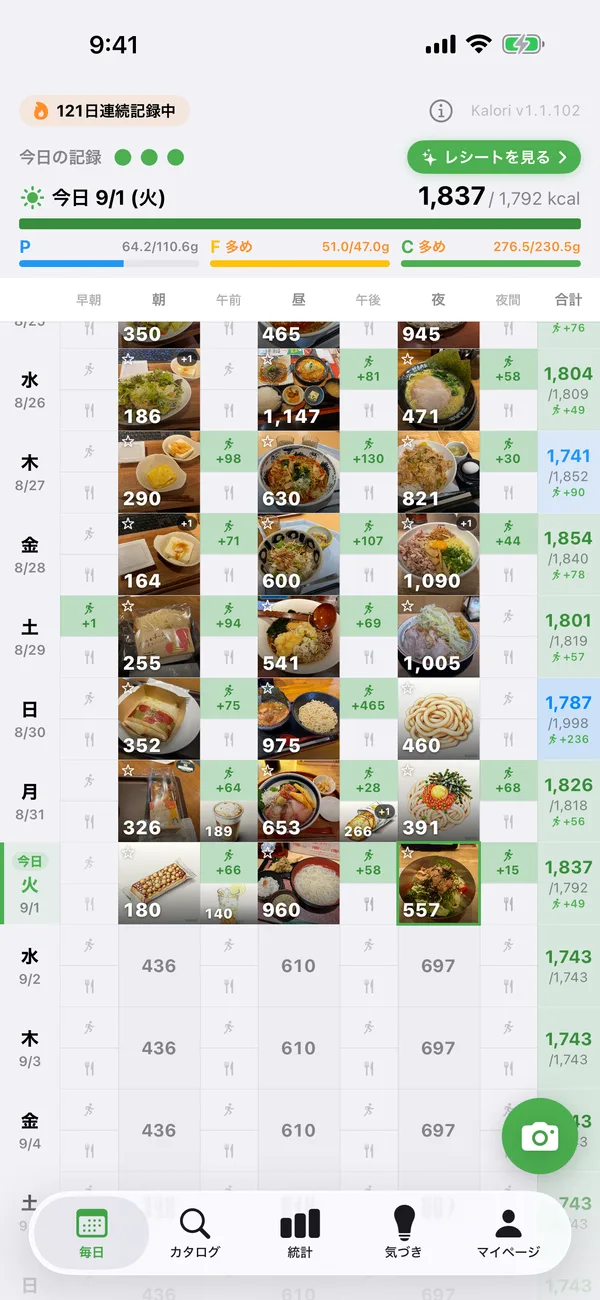
The kalori app's meal calendar
Log in chat → shows up in the app
Text ChatGPT "salad chicken for lunch" on the go. Open the app and it's already sitting in the lunch slot on your calendar.
Log in the app → review in chat
Photo records from the app feed the conversation too — ask Claude "how did my PFC look today?" at night.
One data set, growing everywhere
Stats, streaks and nutrition receipts grow from the same records no matter where you log. No double entry, no manual sync.
What you can do from chat
Catalog search (free)
Search 54,000+ items across 410+ Japanese chains by name or calorie range. Official nutrition data plus AI estimates.
Log by dish name (Premium / trial)
A database of ~4,000 generic dishes (ramen, oyakodon and more). Home cooking and non-chain meals get standard nutrition with component breakdowns.
Log & edit meals (Premium / trial)
Say what you ate to log it; say "left half of it" or "it was two servings" to fix it. Past dates work too — handy for importing history.
Weight logging (Premium / trial)
Just say "64.8 kg this morning" and it lands on your weight chart. Your daily report becomes the record.
Nutrition advice (Premium / trial)
"What can I still eat today?" "Am I getting enough protein this week?" "How about iron?" — answered from your records and goals, down to 27 micronutrients.
Exercise, favorites & ratings (Premium / trial)
"Ran 30 minutes" logs the burn; "add this to favorites" and "that ramen was a 7" work right from chat too.
Planning & budgets (Premium / trial)
"Keep tomorrow's dinner under 800 kcal" "Saturday is a cheat day" — set budgets, find meals that fit, and place them on the plan calendar, all in conversation.
Set suggestions (Premium / trial)
"What fits in my remaining 600 kcal at 7-Eleven?" — get product combos that match your calorie and PFC targets.
Tools
Once connected, your chat AI picks from these tools automatically as the conversation flows — no tool names to remember.
Search & browse
-
search_foodsFreeUnified catalog search (20,000+ chain items + ~4,000 generic dishes, same engine as the iOS app)
-
search_my_foodsPremiumSearch your own foods (re-log items you created via photo analysis or manually)
-
get_usual_mealsPremiumYour usual meals (what you log most often in the last 90 days, ready to re-log "the usual")
-
list_shopsFreeList of covered chains
Log
-
log_mealsPremiumLog meals (up to 10 at once; past dates for migration, future dates for planning)
-
update_mealPremiumEdit a logged meal (portion, quantity, date, components, shop attribution); applies after you confirm
-
delete_mealPremiumDelete a mislogged meal (runs after you confirm)
-
log_exercisePremiumLog an exercise (burned kcal, type, duration)
-
delete_exercisePremiumDelete an exercise entry (runs after you confirm)
-
log_weightPremiumLog body weight (one per day, same-day overwrite)
-
rate_mealPremiumRate a logged meal (private 9-point scale with a note)
Review
-
get_mealsPremiumFetch logged meals (with components, shop and detail; name search across all history)
-
get_nutrition_summaryPremiumDaily calories & PFC vs your goals (per-slot budgets; detailed 27-nutrient view)
-
get_exercisesPremiumFetch exercise entries
-
get_weightsPremiumWeight history
-
get_profile_and_goalsFreeCheck connection status and quota; profile and goals are returned during Premium or trial
Favorites & planning
-
get_favoritesPremiumList favorites (great input for "pick dinner from my favorites")
-
add_favoritePremiumAdd to favorites
-
remove_favoritePremiumRemove from favorites
-
set_slot_budgetPremiumSet a per-slot budget ("keep 800 kcal for tomorrow's dinner"); applies after you confirm
-
set_day_budgetPremiumOverride the daily goal for one day (cheat days etc.); applies after you confirm
-
clear_budgetPremiumClear a budget you set (runs after you confirm)
Suggest
-
suggest_meal_setPremiumProduct combos that fit your calorie & PFC targets
A linked Kalori account is required. Catalog search is available without a purchase. Kalori accounts registered on the web currently have complimentary access to personal-record features through external AI integrations under a grace policy. No end date has been set; a paid plan may be required in the future. Usage limits still apply. Accounts outside this grace policy use their existing entitlement or integration trial. The trial lasts seven consecutive days from the first eligible operation and is not consumed while grace access applies. Effective-plan quotas are free: 10/day and Premium: 100/hour. Grace accounts receive the Premium-equivalent quota. Personal API & full spec
Setup by chat app
Use with ClaudeFree plan OK
- 1.
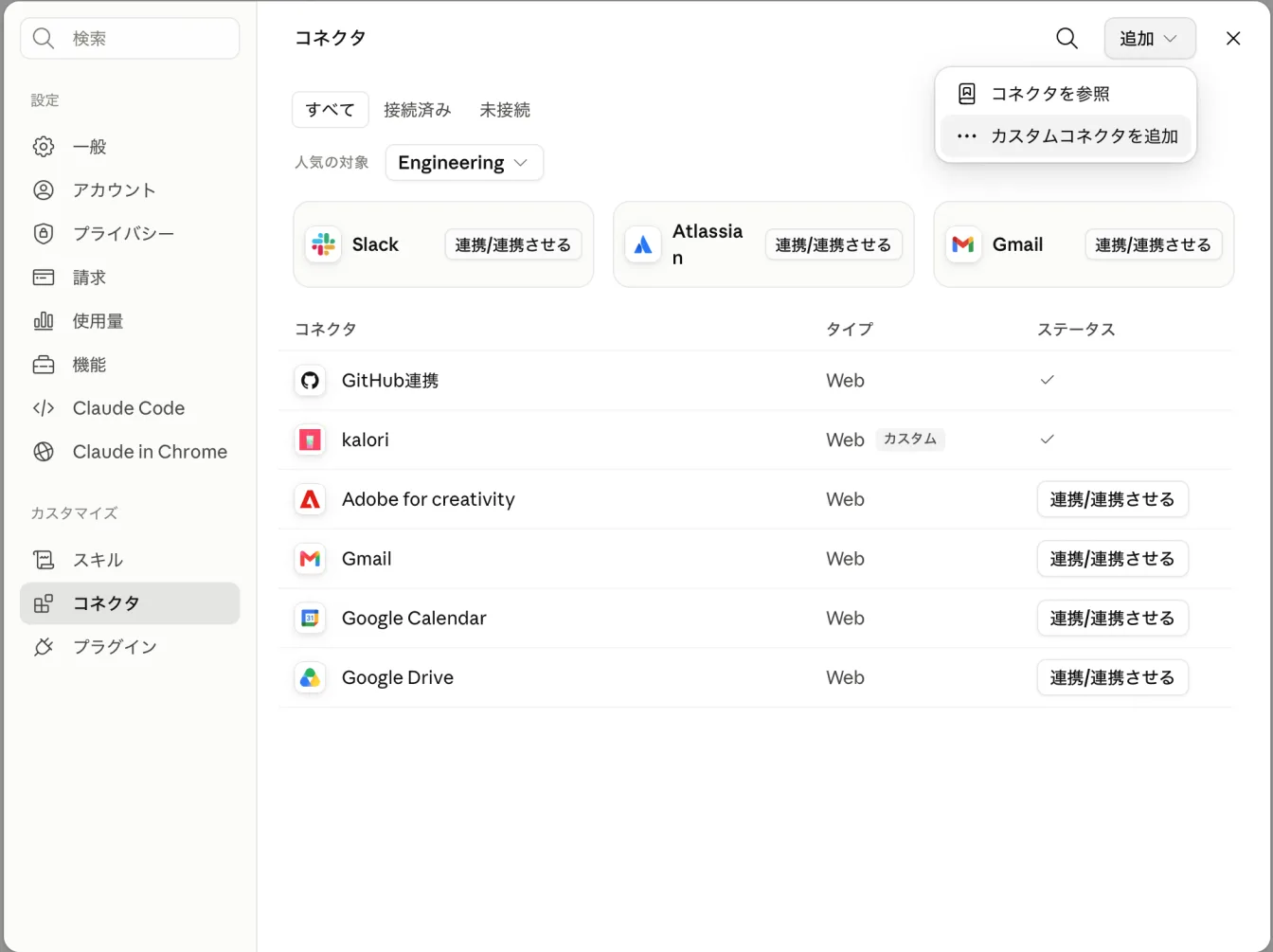
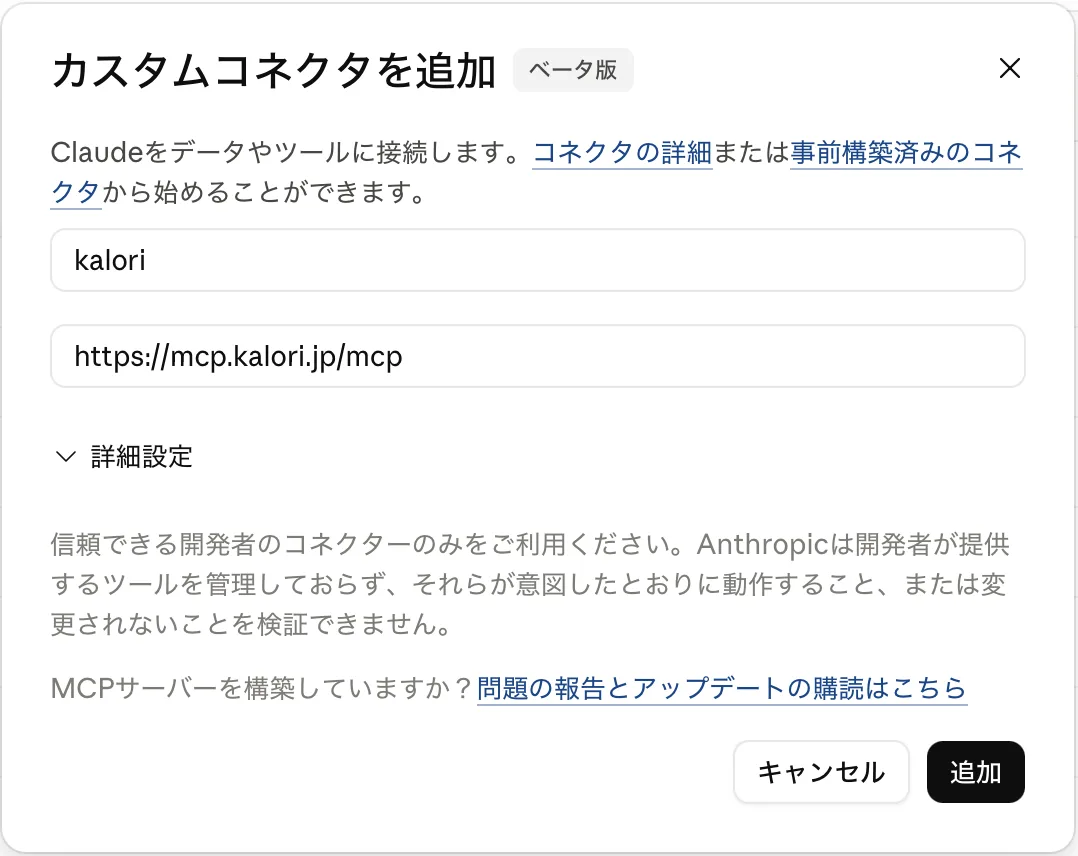
On claude.ai (web or desktop), open Settings → Connectors, then choose 'Add' → 'Add custom connector' at the top right
- 2.
Enter a name (e.g. kalori) and the connector URL, then click 'Add'
- 3.
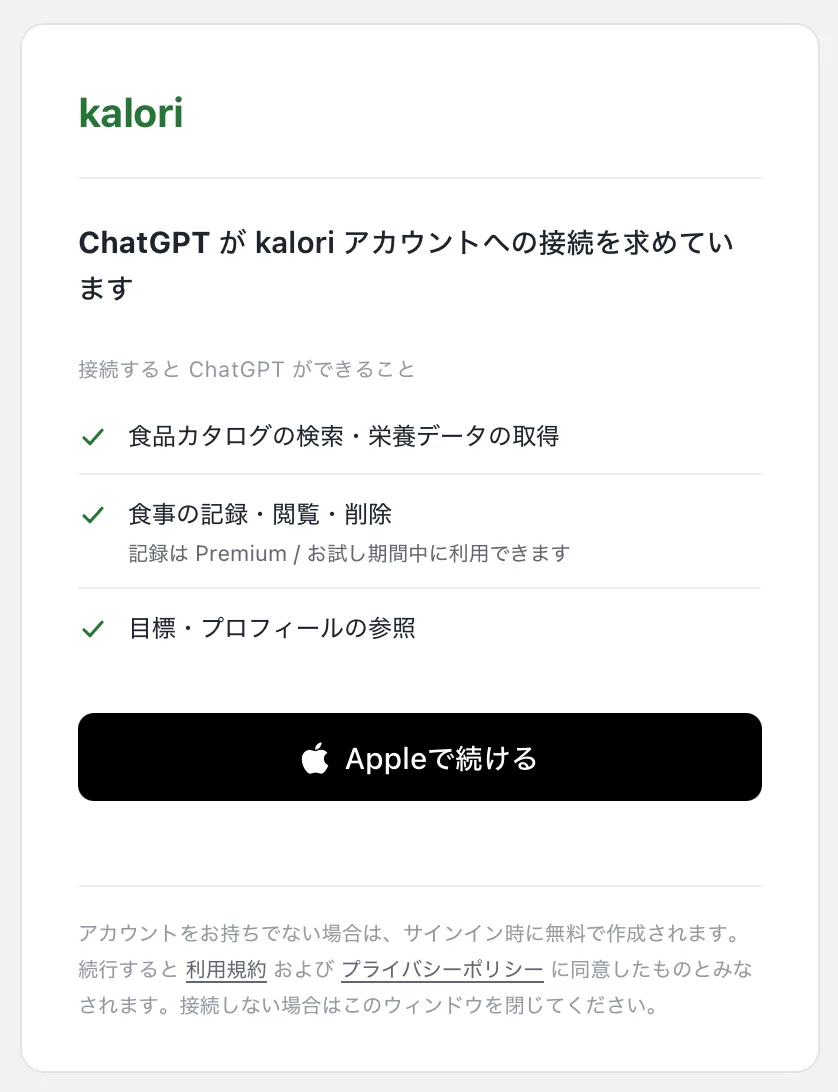
When connecting, the kalori page opens — sign in with Apple and approve
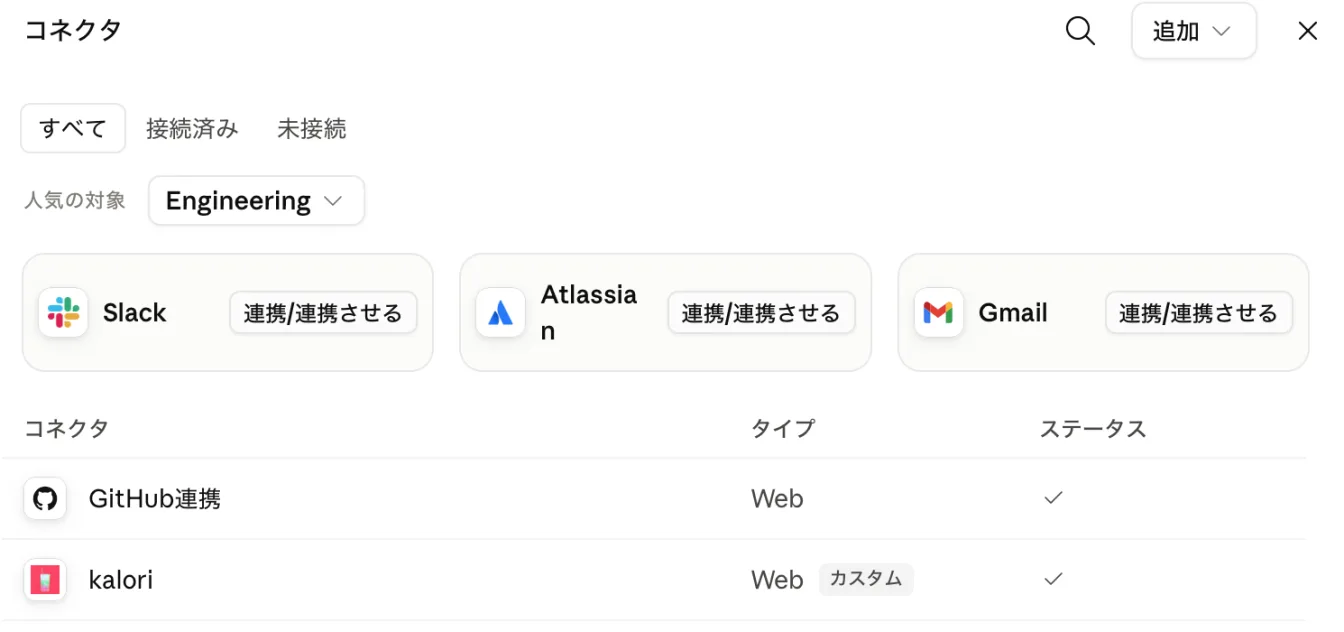
Works on the free plan (one custom connector). Once connected, it also works in the mobile app on the same account.
Get it on the App StoreUse with ChatGPTFree plan OK
- 1.
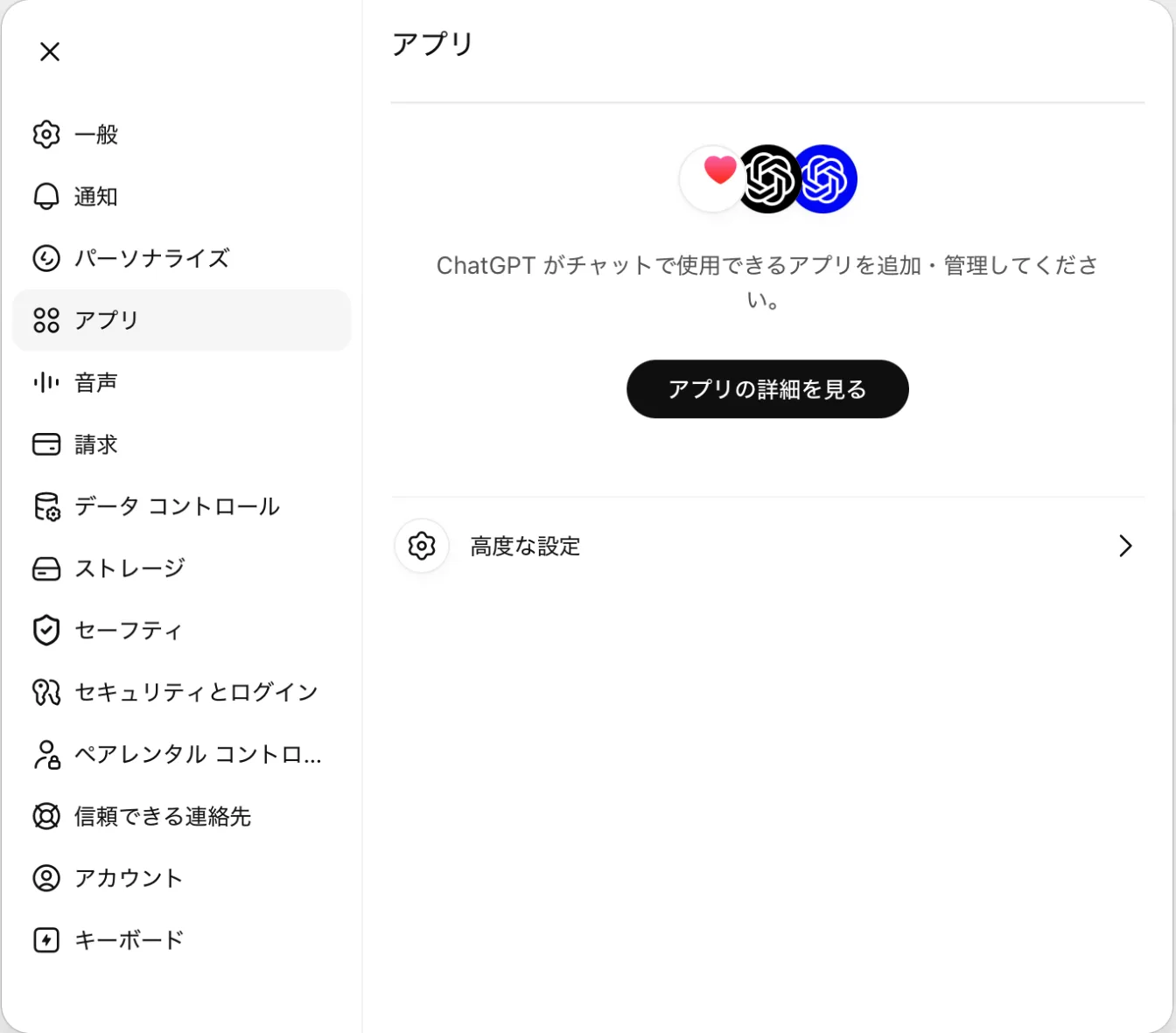
On chatgpt.com, open Settings → Apps → Advanced settings
- 2.
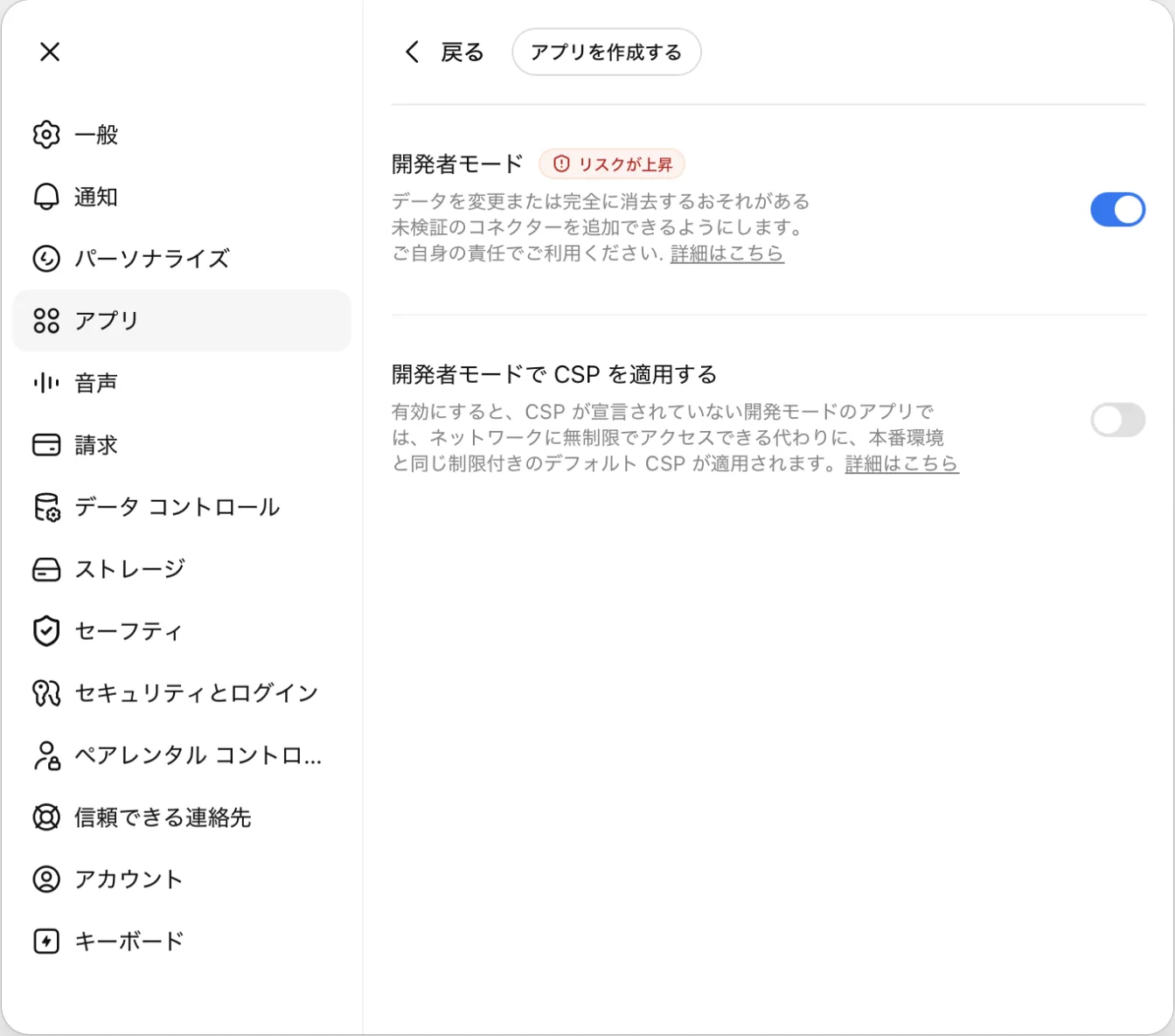
Turn on 'Developer mode'
- 3.
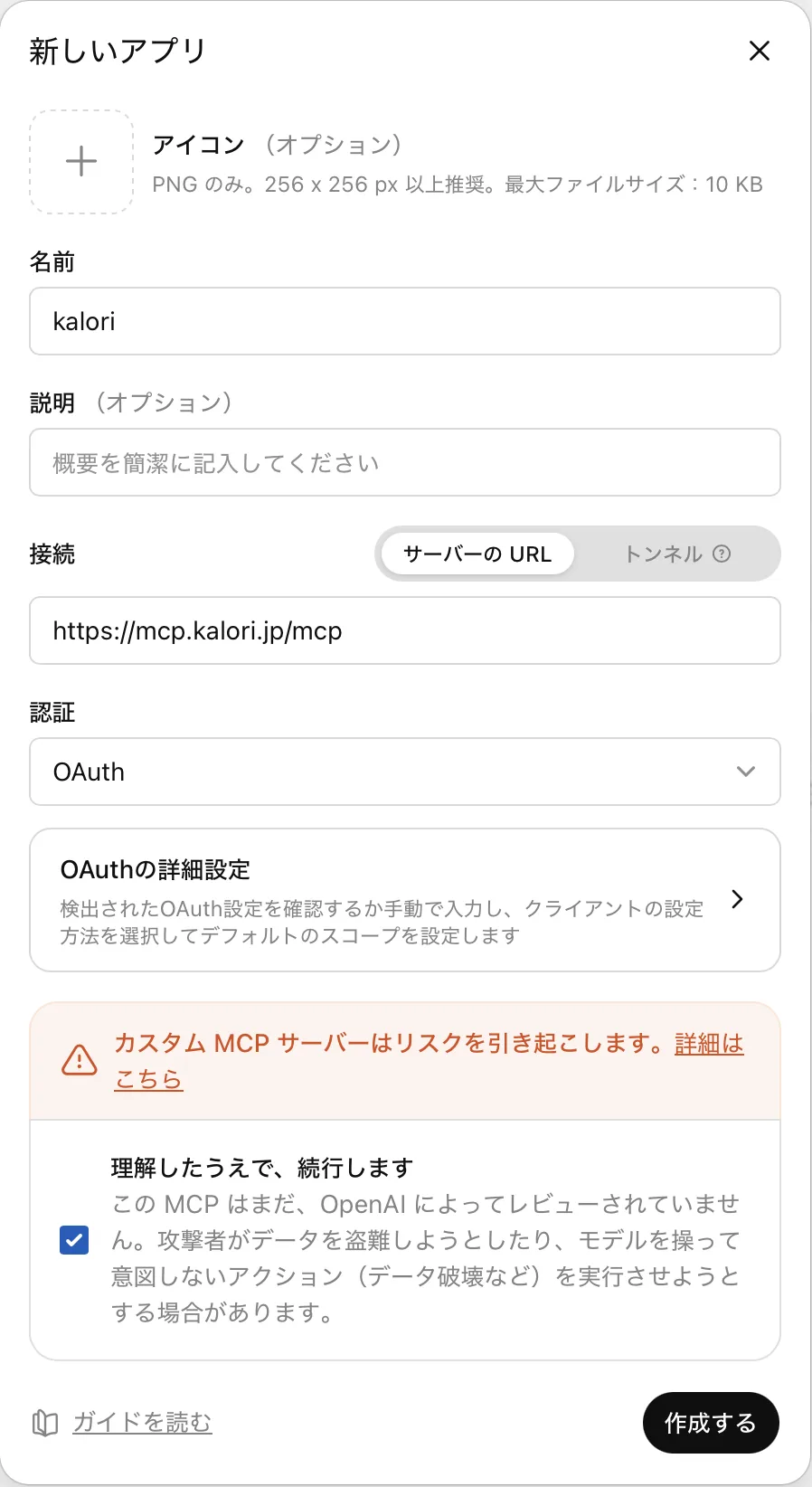
Back on the Apps screen, choose 'Create app': name it kalori and set the server URL to the connector URL (keep auth as OAuth — no client ID needed)
- 4.
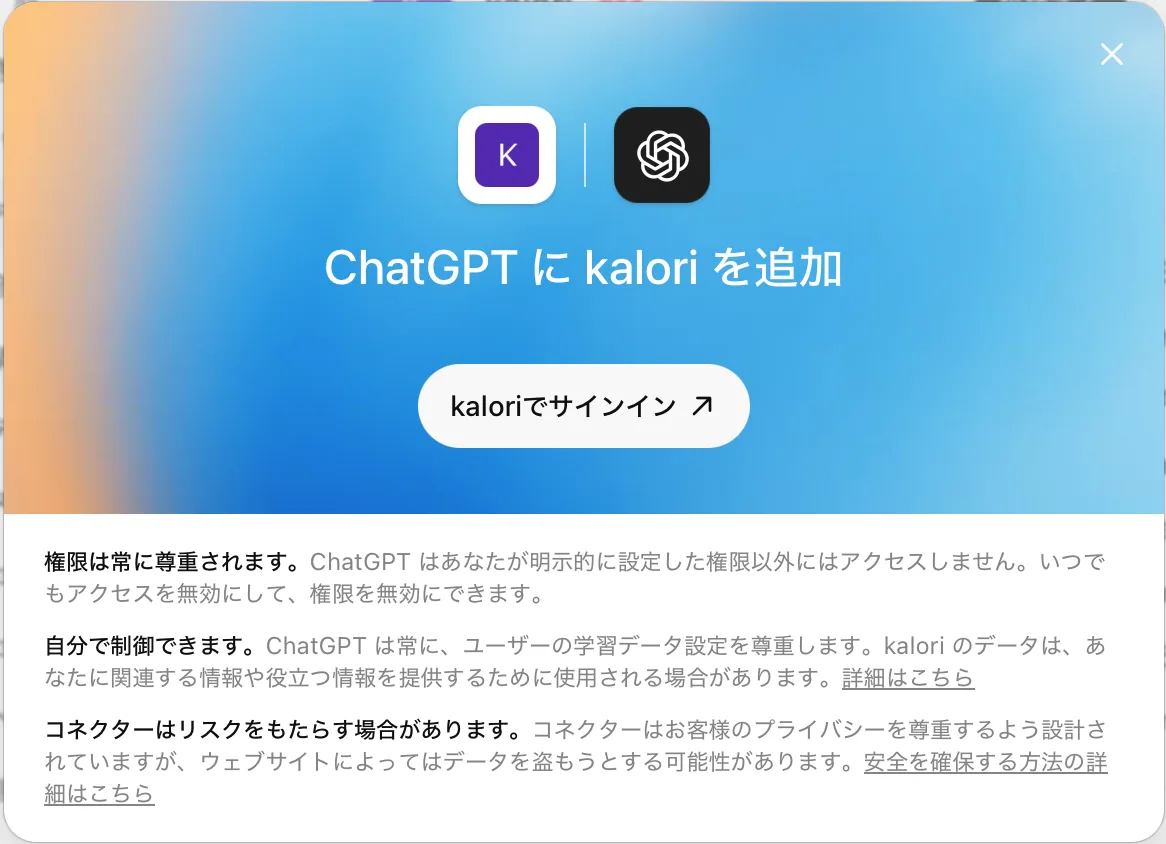
On the 'Add kalori to ChatGPT' screen, click 'Sign in with kalori', then sign in with Apple and approve
- 5.
In a conversation, enable kalori from the '+' menu in the composer
Developer mode requires enabling the tool per conversation from '+'. We recommend keeping one ongoing thread for meal logging.
Get it on the App StoreOther MCP-enabled apps
Chat AIs with MCP connector support (such as Perplexity) can also connect: add the connector URL as an MCP server in settings and complete the OAuth consent (Apple sign-in). We verify against Claude and ChatGPT.
FAQ
Does it cost anything?
A linked Kalori account is required. Catalog search is available without a purchase. Kalori accounts registered on the web currently have complimentary access to personal-record features through external AI integrations under a grace policy. No end date has been set; a paid plan may be required in the future. Usage limits still apply. Accounts outside this grace policy use their existing entitlement or integration trial. The trial lasts seven consecutive days from the first eligible operation and is not consumed while grace access applies.
Can I use it without a kalori account?
A linked Kalori account is required. Catalog search is available without a purchase. Kalori accounts registered on the web currently have complimentary access to personal-record features through external AI integrations under a grace policy. No end date has been set; a paid plan may be required in the future. Usage limits still apply. Accounts outside this grace policy use their existing entitlement or integration trial. The trial lasts seven consecutive days from the first eligible operation and is not consumed while grace access applies.
Do I need to copy tokens?
No. The connection uses standard OAuth and renews itself. You never paste passwords or tokens into chat.
How do I disconnect?
Remove the connector in your chat app's settings. You can also revoke tokens from My Page → External AI in the kalori app.
It's not working — what should I check?
ChatGPT requires Developer mode to be enabled, and the tool must be enabled per conversation from '+'. If it still fails, contact us via in-app feedback or the contact page.
I'm looking for an MCP server for meal tracking. What can kalori do?
kalori is a meal-tracking MCP server from Japan that works with MCP-enabled chat AIs such as ChatGPT, Claude and Perplexity. You can log meals, count calories, manage protein/fat/carbs, ask nutrition questions, and record weight and exercise — all in conversation. It searches 20,000+ Japanese convenience-store and restaurant items plus ~4,000 generic dishes, and everything syncs with the iOS app.
Can I log meals from ChatGPT?
Yes. Add the kalori connector (https://mcp.kalori.jp/mcp) in ChatGPT and you can log by simply saying something like "I had a salad chicken from 7-Eleven for lunch, log it". Entries sync to the iOS app and appear in its calendar and statistics. In ChatGPT you need to enable Developer mode in settings, then enable the tool from the "+" menu in each conversation.
Can I track calories and macros from Claude?
Yes. In Claude's settings, add https://mcp.kalori.jp/mcp as a custom connector and sign in with Apple. It works on Claude's free plan (which allows one custom connector). You can log meals, search nutrition data for Japanese convenience stores and restaurant chains, check remaining calories, and record weight and exercise through conversation.
What is MCP?
MCP (Model Context Protocol) is a standard that lets chat AIs connect to external services and data. Once you register a compatible service as a "connector", the AI can use that service's capabilities as needed during a conversation. kalori implements this standard, so ChatGPT and Claude can use it for meal tracking directly.
Do other meal tracking apps support MCP?
It varies by service. As of July 2026, official MCP servers are still uncommon in the meal- and nutrition-tracking space. kalori offers one, connectable from the free plans of Claude and ChatGPT. Other services may add support, so please check their current documentation when comparing.
Does it work from the ChatGPT and Claude mobile apps?
Yes. Once you have connected on desktop, the same account works in the mobile apps. You can log a meal by talking to the AI right after eating, wherever you are.
Even better with the app
AI photo analysis, the plan calendar, and stats live in the iOS app. Everything you log from chat syncs to the app.